
Most customers should use our free Mac app — see VPN Software - Mac. This manual method is the fallback for managed Macs that can't install it.
Open the VPN configuration screen
Choose the Apple menu () > System Settings, then click Network in the sidebar.
Click the Action pop-up menu (…) at the bottom of the network list and choose Add VPN Configuration > L2TP over IPSec.
Fill in the connection details
Display name: Liberty Shield
Server address: l2tp.mysetup.co.uk
Account name: your Liberty Shield username
Password: your Liberty Shield password
Shared secret (pre-shared key): 953783903
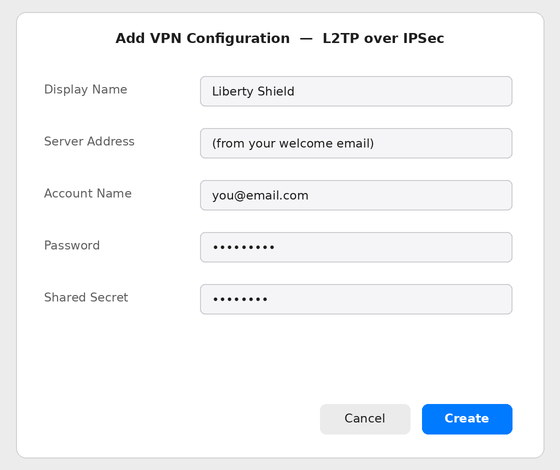
The L2TP configuration sheet filled in for Liberty Shield
Connect
Click Create, then toggle the connection on — you can also connect from the VPN status menu in the menu bar.
Check it worked: visit showmemyip.com — it should show the VPN country.
Greg
Comments