
Most customers should use our free iOS app — this manual method is the fallback for managed devices.
1
Add the VPN configuration
Open Settings > General > VPN & Device Management > VPN.
Tap Add VPN Configuration… and choose Type: L2TP.
2
Fill in the connection details
Description: Liberty Shield
Server: l2tp.mysetup.co.uk
Account: your Liberty Shield username
Password: your Liberty Shield password
Secret (pre-shared key): 953783903
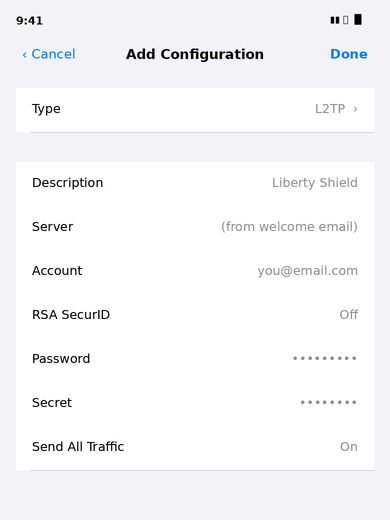
The Add Configuration screen filled in for Liberty Shield
3
Connect
Tap Done, then switch the VPN on from the Settings toggle.
Note: iOS removed PPTP support in iOS 10 — if an older guide told you to use PPTP, use L2TP instead.
Check it worked: visit showmemyip.com — it should show the VPN country.
Greg
Comments